
Cyber-Safety: 5 Red Flags in UK Mobile Banking Apps (2026 Protection Guide)
Transparency Disclosure: To keep our guides free for everyone, this post contains affiliate links and display advertisements. If you click an affiliate link and sign up, we may earn a commission at no extra cost to you. As an ex-banker with 25 years of experience, I only recommend tools that I believe provide genuine value to your financial health. Read our full Affiliate Disclosure here.
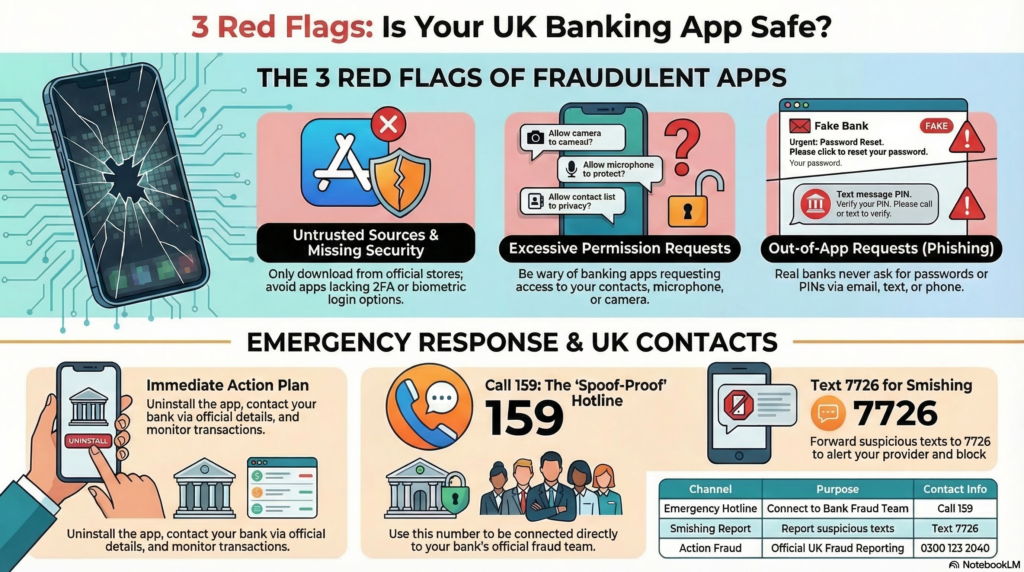
Mobile banking has made managing money faster and easier than ever. But as convenience increases, so do the risks. Cybercriminals are constantly evolving their tactics, targeting users through fake apps, phishing, and security loopholes.
Whether you’re using a traditional bank or a fintech app, knowing what to look out for can help protect your money.
In this guide, we highlight 5 key red flags in UK mobile banking apps—and what you should do if you spot them.
1. The App Isn’t from a Trusted Source
One of the most common scams involves fake banking apps designed to look identical to legitimate ones.
Always download apps from official platforms like:
- Google Play Store
- Apple App Store
Red flags:
- The app name is slightly misspelled
- Very few downloads or reviews
- Poor ratings or suspicious comments
👉 Tip: Always check the developer name matches the official bank (e.g., HSBC UK, Barclays).
2. Weak or Missing Security Features
Legitimate UK banking apps typically include strong security layers such as:
- Biometric login (fingerprint/Face ID)
- Two-factor authentication (2FA)
- Automatic logout after inactivity
Red flags:
- Only requires a simple password
- No 2FA or biometric option
- No session timeout
👉 If an app lacks these basics, it may not meet modern UK security standards.
3. Unusual Permission Requests
Banking apps should only request access necessary for their function.
Red flags:
- Asking for access to your contacts
- Requesting microphone or camera without clear reason
- Demanding location access at all times
👉 Rule of thumb: If it feels unrelated to banking, don’t allow it.
4. Frequent Glitches or Suspicious Behaviour
A secure app should run smoothly and predictably.
Red flags:
- App crashes during login or payments
- Transactions not showing correctly
- Random logouts or repeated login requests
These could indicate:
- Poor development
- Or worse, a compromised or malicious app
5. Requests for Sensitive Information Outside the App
No legitimate UK bank will ask for sensitive information via:
- Text message
- Phone calls
Especially things like:
- Full passwords
- PIN codes
- One-time passcodes
This is often linked to scams like Phishing.
👉 If you receive such requests, treat them as suspicious immediately.
What To Do If You Spot These Red Flags
If something doesn’t feel right, act quickly:
1. Stop Using the App
Uninstall it immediately if you suspect it’s fake or compromised.
2. Contact Your Bank Directly
Use official contact details from their website—not from messages or emails.
3. Monitor Your Accounts
Check for:
- Unauthorised transactions
- Changes to your details
4. Report the Issue
You can report fraud to:
- Action Fraud
How to Stay Safe When Using Banking Apps
Here are a few simple but powerful habits:
- Keep your phone software updated
- Use strong, unique passwords
- Enable biometric login and 2FA
- Avoid public Wi-Fi for banking
- Regularly review your transactions
🚨 UK Fraud Emergency Contacts
If you think you are being scammed right now, use these official UK channels:
- 📞 Call 159: The “spoof-proof” hotline. Dial this to be connected directly to your bank’s fraud team. Use this if you get a suspicious call from someone claiming to be your bank or the police.
- 📲 Text 7726: Forward any suspicious or “smishing” text messages to this number (spells ‘SPAM’ on your keypad). It’s free and alerts your mobile provider to block the sender.
- 🛡️ Action Fraud: Report the incident officially at [suspicious link removed] or call 0300 123 2040.
- 🏴In Scotland? Report directly to Police Scotland by calling 101.
Final Thoughts
Mobile banking is generally very secure in the UK—but only if you use it wisely. Most scams succeed not because of technology failures, but because users are tricked into trusting the wrong app or message.
By recognising these 5 red flags, you can significantly reduce your risk and keep your finances safe.
Why Trust Bright Savings UK?
Bright Savings UK is run by a former banker with over 25 years of experience in the banking and financial services industry. Our goal is to help everyday people save smarter, with clear explanations and practical guidance.
Suggested Internal Links
- How AI ‘Self-Driving’ Wealth Tools Can Save You £500 a Year (2026 Guide) [Link]
- How to Earn £300 Opening a UK Bank Account (2026 Cashback Guide) [Link]
- Best Savings Apps in the UK: A Beginner’s Guide (2026) [Link]
How We Monetize This Site
To support the research and running of Bright Savings UK, we use two primary methods of monetization:
- Affiliate Links: Some links on this site are affiliate links. If you click and open an account, we may receive a commission. This does not change the price or terms you receive from the provider.
- Display Advertising: We host third-party advertisements through Google AdSense. We do not directly control the specific products shown in these ad units, and their presence does not constitute an endorsement by Bright Savings UK.
Disclaimer: This article is for educational purposes only and does not constitute financial advice. Always review provider terms directly before applying.